Posts Tagged ‘Adobe’

Data nightmares: B40 and counting its π-electrons

Saturday, July 19th, 2014

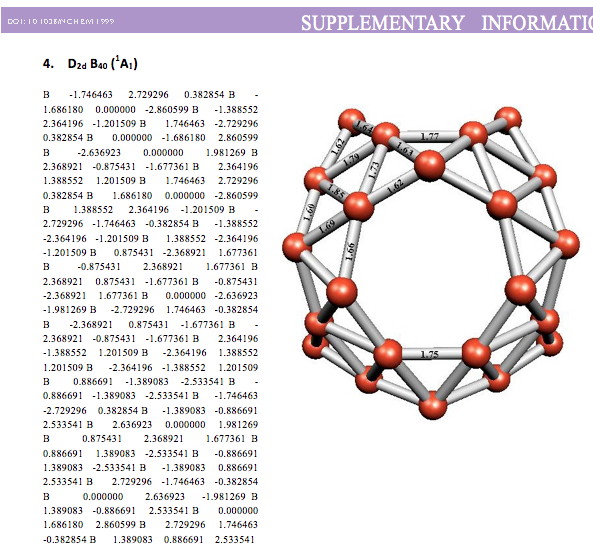
Whilst clusters of carbon atoms are well-known, my eye was caught by a recent article describing the detection of a cluster of boron atoms, B40 to be specific.[1] My interest was in how the σ and π-electrons were partitioned. In a C40, one can reliably predict that each carbon would contribute precisely one π-electron. But boron, being more electropositive, does not always play like that. Having one electron less per atom, one might imagine that a fullerene-like boron cluster would have no π-electrons. But the element has a propensity[2] to promote its σ-electrons into the π-manifold, leaving a σ-hole. So how many π-electrons does B40 have? These sorts of clusters are difficult to build using regular structure editors, and so coordinates are essential. The starting point for a set of coordinates with which to compute a wavefunction was the supporting information. Here is the relevant page: B401 The coordinates are certainly there (that is not always the case), but you have to know a few tricks to make them usable.
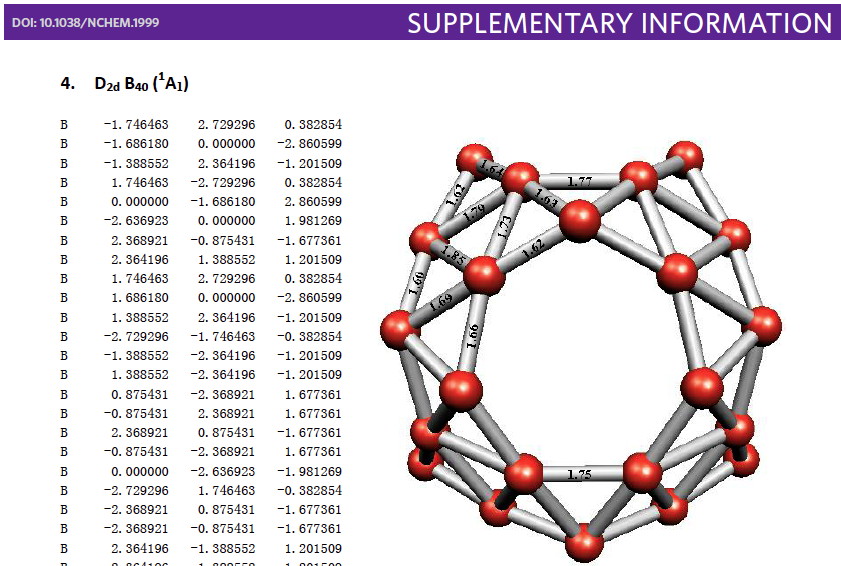
  1. Open Adobe Reader, select the coordinates and copy
  2. Paste into any application which recognises text. I used an old stalwart on the Mac, BBedit. It is reliable!
  3. But no, it produces a row of skull&crossbones characters (the authors of the program clearly have a sense of humour) B402

  4. Thinking that BBedit might have let me down (for the first time), I tried Word. A little less humour, but the same result. B403

  5. There are lots of web sites out there that claim to convert PDF files directly to Word files. Again, no luck, the coordinates are now entirely missing! B404
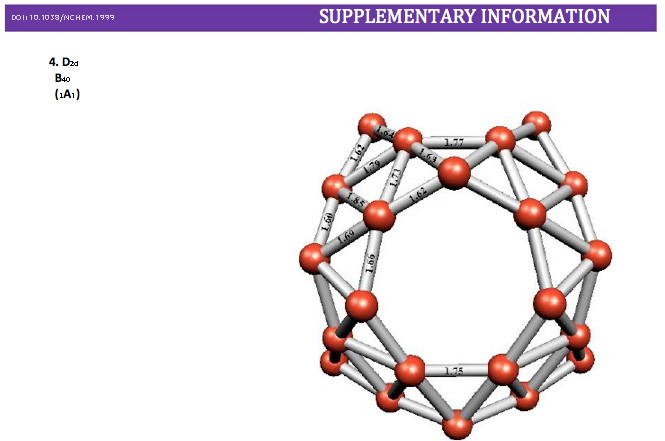
  6. Right, time for the big guns. Adobe Acrobat XI converts .PDF to .DOC, and (if you jump through a lot of hoops to register etc) they even give you a 30 day trial. Well, at least it gives numbers. But notice that the line breaks are missing, and all the numbers flow from one line to another.B405
  7. Another copy/paste from Word to BBedit, and now I have all the numbers, and adding 40 line breaks is all that is needed (there is sometimes some skill in knowing where to add them by the way). The time taken from step 1 to step 7 was about 90 minutes (including a necessary cup of tea to recover from steps 1-5, and the realisation that the time was not wasted, since I could blog the experience!).

Well, I am sure you know what is coming next; my usual rant about how little most chemists truly value data and particularly its integrity and its semantics. And how little almost all journals understand data. Notice that the original article was published in Nature Chemistry. Note also a new journal from that stable, Scientific Data. The journal clearly thinks there is mileage in receiving scholarly articles about scientific data, and what they call data descriptors (they even got me to write a data descriptor a year or so back). Its a shame then that the same publisher allowed the decimation of the core data related to an article about B40.

They have a widely read blog, perhaps they can comment?

One more point to make about data: a phrase has recently been coined: deposition with recognition. Here, I show how my own data has been recognised:

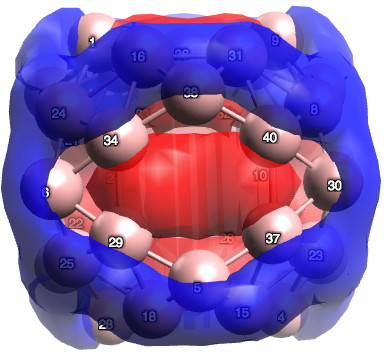
There are various other ways as well, and perhaps I will leave this to another post. To return to the chemistry (where we should have been at the start). I ran the calculation (B3LYP+D3/TZVP) and published the newly enhanced data, citing it in the usual way.[3],[4] To answer my question, for the D2d geometry, B40 has 24 π-electrons (there is some ambiguity, it could be 26). On average, the boron retains only ~0.65s, balanced by ~2.35p electrons. The most stable π-pair is shown below. At the centre of the ring is a strongly diatropic ring current (NICS = -42 ppm)[5] suggesting aromaticity (26 electrons = 4n+2).

B40-29

I conclude by pondering whether the properties of any such boron cluster may in time prove to be directly related to the number of σ-to-π promotions.


Sadly, line breaks in lists of atom coordinates date back to an era of about 50 years ago when text files were first treated differently from binary files. Three different “standards” emerged for specifying a line break (DOS, Mac and Unix) in a text file and much confusion has there been ever since when moving these text files across operating systems. The modern way of doing it is to make line breaks redundant by instead marking up the file. The standard chemical markup, invented in 1996, and formally published in 1999[6], is CML. You will find such CML coordinates in the deposited data from this calculation.[3] You will not have any problems with line breaks!

Publication assigns a DataCite DOI. This takes about 48 hours to propagate to CrossRef, which is here used by the KCite WordPress plugin to retrieve the metadata and compose a citation. If KCite queries CrossRef before the metadata has propagated, it does not generate a citation. If you are reading this and see no citation, please revisit after 48 hours have elapsed.

The diatropicity is inverted to paratropicity (NICS = +28 ppm) when two electrons are removed to create the dication.[7] This inversion is normally a good test of aromaticity/antiaromaticity.


References

  1. H. Zhai, Y. Zhao, W. Li, Q. Chen, H. Bai, H. Hu, Z.A. Piazza, W. Tian, H. Lu, Y. Wu, Y. Mu, G. Wei, Z. Liu, J. Li, S. Li, and L. Wang, "Observation of an all-boron fullerene", Nature Chemistry, vol. 6, pp. 727-731, 2014. https://doi.org/10.1038/nchem.1999
  2. H.S. Rzepa, "The distortivity of π-electrons in conjugated boron rings", Physical Chemistry Chemical Physics, vol. 11, pp. 10042, 2009. https://doi.org/10.1039/b911817a
  3. H.S. Rzepa, "Gaussian Job Archive for B40", 2014. https://doi.org/10.6084/m9.figshare.1111454
  4. H.S. Rzepa, "B 40", 2014. https://doi.org/10.14469/ch/24884
  5. H.S. Rzepa, "Gaussian Job Archive for B40", 2014. https://doi.org/10.6084/m9.figshare.1111518
  6. P. Murray-Rust, and H.S. Rzepa, "Chemical Markup, XML, and the Worldwide Web. 1. Basic Principles", Journal of Chemical Information and Computer Sciences, vol. 39, pp. 928-942, 1999. https://doi.org/10.1021/ci990052b
  7. H.S. Rzepa, "Gaussian Job Archive for B40(2+)", 2014. https://doi.org/10.6084/m9.figshare.1111534

Data-round-tripping: moving chemical data around.

Saturday, November 20th, 2010

For those of us who were around in 1985, an important chemical IT innovation occurred. We could acquire a computer which could be used to draw chemical structures in one application, and via a mysterious and mostly invisible entity called the clipboard, paste it into a word processor (it was called a Macintosh). Perchance even print the result on a laserprinter. Most students of the present age have no idea what we used to do before this innovation! Perhaps not in 1985, but at some stage shortly thereafter, and in effect without most people noticing, the return journey also started working, the so-called round trip. It seemed natural that a chemical structure diagram subjected to this treatment could still be chemically edited, and that it could make the round trip repeatedly. Little did we realise how fragile this round trip might be. Years later, the computer and its clipboard, the chemistry software, and the word processor had all moved on many generations (it is important to flag that three different vendors were involved, all using proprietary formats to weave their magic). And (on a Mac at least) the round-tripping no longer worked. Upon its return to (Chemdraw in this instance), it had been rendered inert, un-editable, and devoid of semantic meaning unless a human intervened. By the way, this process of data-loss is easily demonstrated even on this blog. The chemical diagrams you see here are similarly devoid of data, being merely bit-mapped JPG images. Which is why, on many of these posts, I put in the caption Click for 3D, which gives you access to the chemical data proper (in CML or other formats). And I throw in a digital repository identifier for good measure should you want a full dataset.

It is only now that we (more specifically, this user) understand what had happened under-the-hood to break this round-tripping. In 1984, when Apple produced the Mac, they also produced a most interesting data format called PICT. A human saw the PICT as a PICTure, but the computer saw more. It (could) see additional data embedded in the PICT. The clipboard supported the PICT format, which meant that both picture and data could be transferred between programs. And ChemDraw and Word also understood this. Hence the ability to round-trip noted above (it has to be said between specifically these programs).

Times moved on and the limitations of PICT set in. Apple refocussed on the PDF format. Related, notice, to the Postscript format that Adobe had introduced in order to allow high quality laserprinting. PICT support was abandoned, and the various components no longer carried recognisable data (specifically the clipboard or the ability of Word to recognise the data). Round-tripping broke. Does this matter? Well, one colleague where I work had accumulated more than 1000 chemical diagrams, which he decided to store in Powerpoint (and yes, he threw the original Chemdraw files away). The day came when he wanted to round trip one of them. And of course he could not. He was rather upset I have to say!

PDF was not really a format designed to carry data (see DOI: 10.1021/ci9003688). But, bless their hearts, the three vendors involved in this story all agreed to support data embedded in the PDF hamburger (and Abobe to tolerate it) and now once again, a structure diagram can move into an Office program (on Mac) and out again and retain its chemical integrity. What lessons can be learnt?

  1. Firstly, out of side, out of mind. The clipboard is truly mostly out of sight, and it was not really designed from the outset to preserve data properly. Nowadays I wonder whether clipboards in general recognise XML (and hence CML) and preserve it. I truly do not know. But they should.
  2. Secondly, any system which relies on three or four commercial vendors, who at least in the past, devised proprietary formats which they could change without warning, is bound to be fragile.
  3. We have learnt that data is valuable. More so than the representation of it (i.e. a 2D or 3D structure diagram). But when its lost, the users should care! And tell the vendors.
  4. Peter Murray-Rust and his team have produced CML4Word (or as Microsoft call it, Chemistry add-in for Word). At its heart is data integrity. Fantastic! But I wonder if it survives on Microsoft’s clipboard (I know it does not on Apple’s, since CML4Word is not available on that OS. And is unlikely to ever become so).
  5. And I can see history about to repeat itself. The same seems about to happen on new devices such as the Apple iPad. It too has copy/paste via a clipboard. I bet this will not round trip chemistry (or much other) data! Want to bet that the lessons of this story have not yet been learnt?

Oh, for those who wish to round-trip chemistry on a Mac, you will have to acquire ChemDraw 12.0.2 and Word 2011 (version 14.01), as well as OS X 10.6 for it to work.