Tag: XML

  • Curating a nine year old journal FAIR data table.

    As the Internet and its Web-components age, so early pages start to decay as technology moves on. A few posts ago, I talked about the maintenance of a relatively simple page first hosted some 21 years ago. In my notes on the curation, I wrote the phrase “Less successful was the attempt to include buttons which could be used to annotate the structures with highlights. These buttons no longer work and will have to be entirely replaced in the future at some stage.” Well, that time has now come, for a rather more crucial page associated with a journal article published more recently in 2009.[cite]10.1039/b810301a[/cite]

    The story started a few days ago when I was contacted by the learned society publisher of that article, noting they were “just checking our updated HTML view and wanted to test some of our old exceptions“. I should perhaps explain what this refers to. The standard journal production procedures involve receiving a Word document from authors and turning that into XML markup for the internal production processes. For some years now, I have found such passive (i.e. printable only) Word content unsatisfactory for expressing what is now called FAIR (Findable, accessible, inter-operable and re-usable) data. Instead, I would create another XML expression (using HTML), which I described as Interactive Tables and then ask the publisher to host it and add that as a further link to the final published article. I have found that learned society publishers have not been unwilling to create an “exception” to their standard production workflows (the purely commercial publishers rather less so!). That exceptional link is http://www.rsc.org/suppdata/cp/b8/b810301a/Table/Table1.html but it has now “fallen foul of the java deprecation“. 

    Back in 2008 when the table was first created, I used the Java-based Jmol program to add the interactive component. That page, when loaded, now responds with the message:

    This I must emphasise is nothing to do with the publisher, it is the Jmol certificate that has been revoked. That of itself requires explanation. Java is a powerful language which needs to be “sandboxed” to ensure system safety. But commands can be created which can access local file stores and write files out there (including potentially dangerous ones). So it started to become the practise to sign the Java code with the developer certificate to ensure provenance for the code. These certificates are time-expired and around 2015 the time came to renew it. Normally, when such a certificate is renewed, the old one is allowed to continue operation. On this occasion the agency renewing the certificate did not do this but revoked the old one instead (Certificate has been revoked, reason: CESSATION_OF_OPERATION, revocation date: Thu Oct 15 23:11:18 BST 2015). So all instances of Jmol with the old certificate now give the above error message. 

    The solution in this case is easy; the old Jmol code (as JmolAppletSigned.jar) is simply replaced with the new version for which the certificate is again valid. But simply doing that alone would merely have postponed the problem; Java is now indeed deprecated for many publishers, which is a warning that it will be prohibited at some stage in the future.‡ So time to bite the bullet and remove the dependency on Java-Jmol, replacing it with JSmol which uses only JavaScript.

    Changing published content is in general not allowed; one instead must publish a corrigendum. But in this instance, it is not the content that needs changing but the style of its presentation (following the principle of the Web of a clear-cut separation of style and content). So I set out to update the style of presentation, but I was keen to document the procedures used. I did this by commenting out non-functional parts of the style components of my original HTML document (as <!– comment –>) and adding new ones. I describe the changes I made below.

    1. The old HTML contained the following initialisation code: jmolInitialize(".","JmolAppletSigned.jar");jmolSetLogLevel('0'); which was commented out.
    2. New scripts to initialize instead JSmol were added, such as:
      <script src="JSmol.min.js" type="text/javascript"> </script>
    3. I added further scripts to set up controls to add interactivity.

    4. The now deprecated buttons had been invoked using a Jmol instance:  jmolButton('load "7-c2-h-020.jvxl";isosurface "" opaque; zoom 120;',"rho(r) H")
    5. which was replaced by the JSmol equivalent, but this time to produce a hyperlink rather than a button (to allow the greek ρ to appear, which it could not on a button): <a href="javascript:show_jmol_window();Jmol.script(jmolApplet0,'load 7-c2-020.jvxl;isosurface &quot;&quot; translucent;spin 3;')">ρ(r)</a>,
    6. Some more changes were made to another component of the table, the links to the data repository. Originally, these quoted a form of persistent identifier known as a Handle; 10042/to-800. Since the data was deposited in 2008, the data repository has licensed further functionality to add DataCite DOIs to each entry. For this entry,  10.14469/ch/775. Why? Well, the original Handle registration had very little (chemically) useful registered metadata, whereas DataCite allows far richer content. So an extra column was added to the table to indicate these alternate identifiers for the data.
    7. We are now at the stage of preparing to replace the Java applet at the publishers site with the Javascript version, along with the amended HTML file. The above link, as I write this post, still invokes the old Java, but hopefully it will shortly change to function again as a fully interactive table.
    8. I should say that the whole process, including finding a solution and implementing it took 3-4 hours work, of which the major part was the analysis rather than its implementation.

    It might be interesting to speculate how long the curated table will last before it too needs further curation. There are some specifics in the files which might be a cause for worry, namely the so-called JVXL isosurfaces which are displayed. These are currently only supported by Jmol/JSmol. They were originally deployed because iso-surfaces tend to be quite large datafiles and JVXL used a remarkably efficient compression algorithm (“marching cubes”) which reduces the cube size one hundred-fold or more. Should JSmol itself become non-operational at some time in the (hopefully) far future (which we take to be ~10 years!) then a replacement for the display of JVXL will need to be found. But the chances are that the table itself will decay “gracefully”, with the HTML components likely to outlive most of the other features. The data repository quoted above has itself now been available for ~12 years and it too is expected to survive in some form for perhaps another 10. Beyond that period, no-one really knows what will still remain. 

    You may well ask why the traditional journal model of using paper to print articles and which has survived some 350 years now, is being replaced by one which struggles to survive 10 years without expensive curation. Obviously, a 3D interactive display is not possible on paper.[cite]10.6084/m9.figshare.797481[/cite] But one also hears that publishers are increasingly dropping printed versions entirely. One presumes that the XML content will be assiduously preserved, but re-working (transforming, as in XSLT) any particular flavour of XML into another publishers systems is also likely to be expensive. Perhaps in the future the preservation of 100% of all currently published journals will indeed become too expensive and we might see some of the less important ones vanishing for ever?


    Nowadays it is necessary to configure your system or Web browser to allow even signed valid Java applets to operate. Thus in the Safari browser (which still allows Java to operate, other popular browsers such as Chrome and Firefox have recently removed this ability), one has to go to preferences/security/plugin-settings/Java, enter the URL of the site hosting the applet and set it to either “ask” (when a prompt will always appear asking if you want to accept the applet) or “on” when it will always do so. How much longer this option will remain in this browser is uncertain.

    In the area of chemistry, an early pioneer was the Internet Journal of Chemistry, where the presentation of the content took full advantage of Web-technologies and was on-line only. It no longer operates and the articles it hosted are gone.
  • Conference report: an example of collaborative open science (reaction IRCs).

    It is a sign of the times that one travels to a conference well-connected. By which I mean email is on a constant drip-feed, with venue organisers ensuring each delegate receives their WiFi password even before their room key. So whilst I was at a conference espousing the benefits of open science, a nice example of open collaboration was initiated as a result of a received email.

    Steven Kirk  contacted me with the following query: Do you know of any open-access database of calculated IRCs with coverage of as broad a range of classes of chemical reactions as possible? I recollected that about six years ago, I was exploring the use of iTunesU as a system for delivering course content in a rich-media format. I produced animations for about 115 reactions (many of which as it happens were taken from this blog, but quite a number were also unique to that project) and placed them into iTunesU, and now sending the URL https://itunes.apple.com/gb/course/id562191342 to Steven.

    I should at this point explain something of the structure of such an iTunesU course.

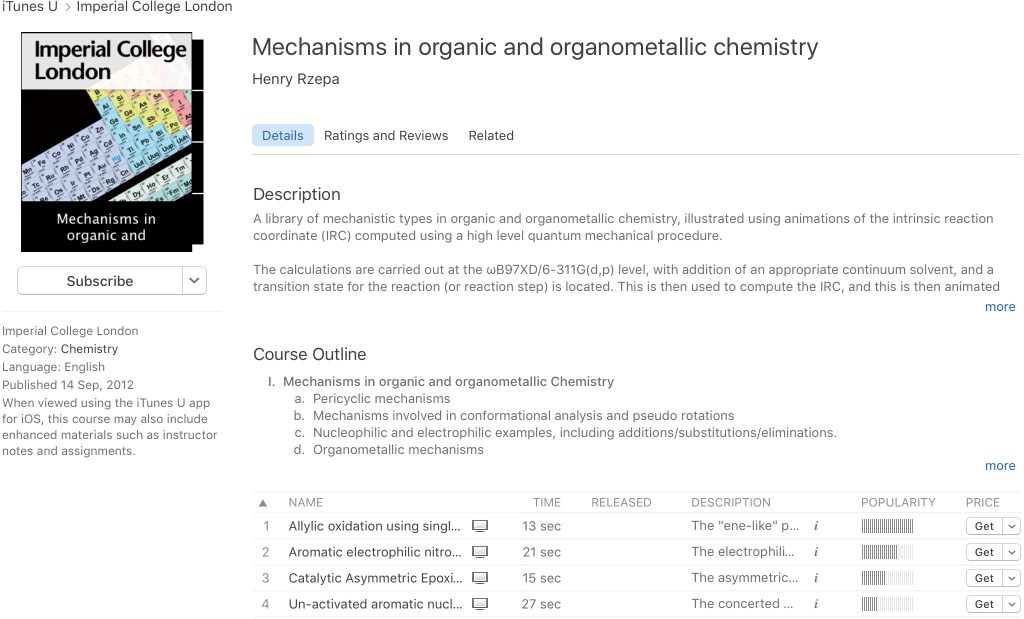
    1. An essential feature is the course icon, seen below on the left. Since the course is hosted by Imperial College, it had to be an officially approved icon. I am sure you can believe me if I tell you that this took a month or so to obtain, with a fair bit of persistence required!
    2. I also had to get approval to place the iTunes app on all the teaching computers so that students could open the course. Believe me again when I tell you that I had to persuade the Apple lawyers in Cupertino to release a special license for this app to persuade our administrators here to install it on the Windows teaching clusters. Another few months had passed by.
    3. When creating an entry (using e.g. https://itunesu.itunes.apple.com/coursemanager/ ) one has to specify values for various descriptors, also often called metadata. Thus any one entry has fields for name and description, with the popularity added by Apple. Only a few words are visible in the description field, which can be expanded in iTunes using the i button.
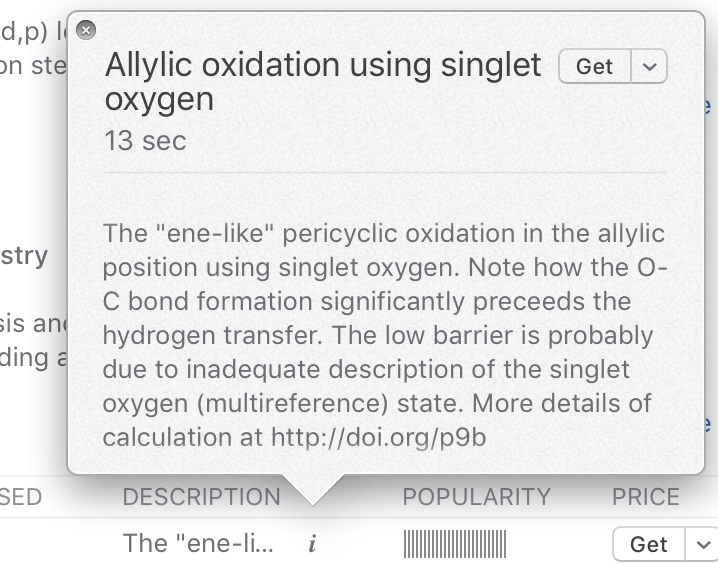
    4. Steven meanwhile had replied asking if the original data that was used to generate the IRC might be available. Specifically his second question was “So the DOIs are only stamped into the animation’s bitmaps, or are they also somewhere in the metadata?“. That little i button is not easy to spot, and there is no indication, in the event, of what information it might actually contain.
    5. Here it is expanded. The contents are unstructured text, into which I have placed the required DOI.
    6. The lesson here is that I had fortunately had the foresight to include a link to the IRC data in anticipation of just such a question from someone in the future. But black mark to Apple here; the text cannot be selected and copied into a clipboard! It is fairly unFAIR data, since it can only be inter-operated (the I of FAIR) by a human re-typing it by hand. And the human has also to recognise the pattern of a DOI; a machine could not obtain this information easily. Moreover Steven is a Linux user; he does not readily have access to the iTunes app on this operating system!
    7. Also, there were 115 such entries, and now the prospect was rearing that each would have to be hand processed. Moreover, because the text was unstructured, there was no guarantee that I would have adopted the same pattern for all 115 entries.
    8. Fortunately Steven was on the ball. I quote again: it turns out iTunes isn’t needed at all. A service I found on the web http://picklemonkey.net/feedflipper-home/ takes an ITunes URL and converts it to an RSS feed. Opening this feed in Firefox and RSSOwl respectively let me save the feed as XML and HTML (both attached).
    9. This is currently where we stand (Steven’s first email was two days ago), but it’s not finished yet. Depending on how assiduous I was five years ago, some DOIs to the data may be acquired from the list. Sometimes I simply wrote e.g. See http://www.ch.imperial.ac.uk/rzepa/blog/?p=6816 knowing that the links to the data were there instead. I can already see that some descriptions have neither a DOI nor a link to the blog. More detective work will be needed, unfortunately.

    How might the situation described above been avoided? Well, Apple in iTunesU only provided in effect one metadata field, and this was an unstructured one. Anything went in that field. Had they provided (or had the course creator been able to configure it themselves) there might have been another field entitled say “data source“. This could moreover been made a mandatory field and a structured one. Thus it might have only accepted known types of persistent identifier, such as a DOI. Further, the system could have checked that the DOI was actually resolvable. Before you ask, I did log a “bug” with Apple asking this be done, but nothing ever was. With such a tool to hand, I might have achieved data sources for all the 115 entries. The resulting XML (as generated above) could have been used to automate the retrieval of all 115 datasets describing this course. 

    At this stage then, Steven can follow-up his interest in building a reaction IRC library and analysing it. I will do all I can to encourage Steven not to make the mistakes I did and to ensure that any further data that is required to augment the library does not suffer the problems above. On the other hand, I console myself that in two days, much of the data for the course I created five years ago was salvageable; I wonder how many other iTunesU courses there are for which that can be said!

    I will let (with some blushing) the final word be Steven’s: You are one of the few chemists who has both pioneered and built the principles of ‘open chemistry’ into their actual scientific work. I visit your blog occasionally knowing that there is a very high probability I could download and tinker with the results of real calculations.


    Might I assure all the speakers that I concentrated totally on their talks rather than incoming emails!

  • A nice example of open data (in London).

    Living in London, travelling using public transport is often the best way to get around. Before setting out on a journey one checks the status of the network. Doing so today I came across this page: our open data from Transport for London. 

    1. I learnt that by making TFL travel data openly available, some 11,000 developers (sic!) have registered for access, out of which some 600 travel apps have emerged.
    2. The data is in XML, which makes it readily inter-operable.[cite]10.1021/ci990052b[/cite]
    3. This encourages crowd-sourced innovation.
    4. They have taken the trouble to produce an API (application programmable interface) which allows rich access to the data and information about e.g. AccidentStats, AirQuality, BikePoint, Journey, Line, Mode, Occupancy, Place, Road, Search, StopPointVehicle.

    Chemists could learn some lessons here! Of course, there are quite a few chemical databases with APIs that are examples of open data, but the “ESI” (electronic supporting information) sources which almost all published articles rely upon to disseminate data are clearly struggling to cope. Take for example this recent article[cite]10.1021/jacs.6b13229[/cite], where much of the data has been dropped into the inevitable PDF “coffin” and which is a breathtaking 907 pages long. To give the authors their due, they also provide 20 CIF files which ARE good sources of data. Rarely commented on, but clearly missing from the information associated with this (indeed most) articles is the metadata about the data. Thus the metadata for these CIF files amounts to just e.g. 229. To find out the context, one has to scour the article (or the 907 pages of the ESI) to identify compound 229 (I strongly suspect it’s a molecule because of the implied semantics of the term, not because its been explicitly declared). You will not find the metadata at e.g. data.datacite.org which is one open aggregator and global search engine based on deposited metadata.

    I have commented elsewhere on this blog that other types of data could also be enhanced in the manner that CIF crystallographic files represent. For example the Mpublish NMR project, examples of which are shown here, and for which typical data AND its metadata can be seen at DOI: 10.14469/hpc/1053. I fancy that if this method had been adopted,[cite]10.1021/jacs.6b13229[/cite] those 907 pages might have shrunk somewhat, although of course not entirely. But my hope is that gradually the innovative chemistry community will find ways of exhuming more and more data from the PDF coffin and in the process reducing the paginated lengths of the PDF-based ESI further, perchance eventually even to zero?

    If you are yourself preparing an article and sweating over the ESI at this very moment, do please take a look at the Mpublish method and how perhaps it can help make your NMR data at least more useful to others.


    I understand an article describing this project is in preparation. If you cannot wait, this recent application of the Mpublish project has some details.[cite]10.1186/s13321-017-0190-6[/cite]

  • Revisiting (and maintaining) a twenty year old web page. Mauveine: The First Industrial Organic Fine-Chemical.

    Almost exactly 20 years ago, I started what can be regarded as the precursor to this blog. As part of a celebration of this anniversary,[cite]10.3390/molecules22040549[/cite] I revisited the page to see whether any of it had withstood the test of time. Here I recount what I discovered.

    The site itself is at www.ch.ic.ac.uk/motm/perkin.html  and has the title “Mauveine: The First Industrial Organic Fine-Chemical” It was an application of an earlier experiment[cite]10.1039/P29950000007[/cite] to which we gave the title “Hyperactive Molecules and the World-Wide-Web Information System“. The term hyperactive was supposed to be a play on hyperlinking to the active 3D models of molecules built using their 3D coordinates. The word has another, more negative, association with food additives such as tartrazine – which can induce hyperactivity in children – and we soon discontinued the association. This page was cast as a story about a molecule local to me in two contexts; the first being that the discoverer of mauveine, W. H. Perkin, had been a student at what is now the chemistry department at Imperial College. The second was the realization that where we lived in west London was just down the road from Perkin’s manufacturing factory. Armed with (one of the first) digital cameras, a Kodak DC25, I took some pictures of the location and added them later to the web page. The page also included two sets of 3D coordinates for mauveine itself and alizarin, another dyestuff associated with the factory. These were “activated” using HTML to make use of the then very new Chime browser plugin; hence the term hyperactive molecule.

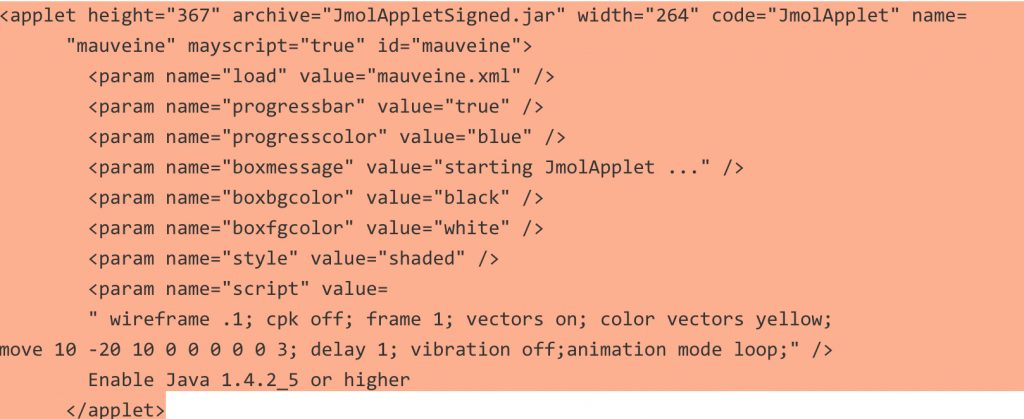
    This first effort, written in December 1995, soon needed revision in several ways. I note that I had maintained the site in 1998, 2001, 2004 and 2006. This took the form of three postscripts to add further chemical context and more recent developments and in replacing the original Chime code for Java code to support the new Jmol software (Chime itself had been discontinued, probably around 2001 or possibly 2004). With the passage of a further ten years, I now noticed that the hyperactive molecules were no longer working; the original Jmol applet was no longer considered secure by modern browsers and hence deactivated. So I replaced this old code with the latest version (14.7.5 as JmolAppletSigned.jar) and this simple fix has restored the functionality. The coordinates themselves were invoked using the HTML applet tag, which amazingly still works (the applet tag had replaced an earlier one, which I think might have been embed?).  A modern invocation would be by using e.g. the JSmol Javascript based tool and so perhaps at some stage this code will indeed need further revision when the Java-based applet is permanently disabled.

    You may also notice that the 3D coordinates are obtained from an XML document, where they are encoded using CML (chemical markup language[cite]10.1021/ci990052b[/cite]), which is another expression from the family that HTML itself comes from. That form may well last rather longer than earlier formats – still commonly used now – such as .pdb or .mol (for an MDL molfile). 

    Less successful was the attempt to include buttons which could be used to annotate the structures with highlights. These buttons no longer work and will have to be entirely replaced in the future at some stage.

    The final part of the maintenance (which I had probably also done with the earlier versions) was to re-validate the HTML code. Checking that a web page has valid HTML was always a behind-the-scenes activity which I remember doing when constructing the ECTOC conferences also back in 1995 and doing so probably does prolong the longevity of a web page. This requires “tools-of-the-trade” and I use now (and indeed did also back in 1995 or so) an industrial strength HTML editor called BBedit. To this is added an HTML validation tool, the installation of which is described at https://wiki.ch.ic.ac.uk/wiki/index.php?title=It:html5 I re-ran this again and so this 2017 version should be valid for a little while longer at least. The page itself now has not just a URL but a persistent version called a DOI (digital object identifier), which is 10.14469/hpc/2133[cite]10.14469/hpc/2133[/cite]. In theory at least, even if the web server hosting the page itself becomes defunct, the page could – if moved – be found simply from its DOI. The present URL-based hyperlink of course is tied to the server and would not work if the server stopped serving.

    To complete this revisitation, I can add here a recent result. Back in 1995, I had obtained the 3D coordinates of mauveine using molecular modelling software (MOPAC) together with a 2D structure drawing package (ChemDraw) because no crystal structure was available. Well, in 2015 such structures were finally published.[cite]10.3184/174751915X14474318419130[/cite] Twenty years on from the original “hyperactive” models, their crystal structures can be obtained from their assigned DOI, much in the same manner as is done for journal articles: Try DOI: 10.5517/CC1JLGK4[cite]10.5517/CC1JLGK4[/cite] or DOI: 10.5517/CC1JLGL5[cite]10.5517/CC1JLGL5[/cite].

    At some stage, web archaeology might become a fashionable pursuit. Twenty year old Web pages are actually not that common and it would be of interest to chart their gradual decay as security becomes more important and standards evolve and mature. One might hope that at the age of 100, they could still be readable (or certainly rescuable). During this period, the technology used to display 3D models within a web page has certainly changed considerably and may well still do so in the future. Perhaps I will revisit this page in 2037 to see how things have changed!


    The old code can still be seen at www.ch.ic.ac.uk/motm/perkin-old.html

    It should really be postscript 4.

  • Research data: Managing spectroscopy-NMR.

    At the ACS conference, I have attended many talks these last four days, but one made some “connections” which intrigued me. I tell its story (or a part of it) here.

    But to start, try the following experiment.

    1. Find a Word document of .docx type on your hard drive
    2. Remove the .docx suffix and replace it with a .zip suffix.
    3. Expand as if it is an archive (it is!).
    4. A folder is created and this itself contains four further folders. These all contain XML files, and in the sub-folder actually called word you will find something called document.xml That file contains the visible content of the document; all the others are support documents, including styles etc.

    The reason this is important was made clear in Santi Dominguez’ talk. Most of it was concerned with introducing Mbook, an ELN (electronic laboratory notebook) but the relevance to the above comes from his introduction of Mpublish, a forthcoming product targeting the area of research data management. What is the connection? Well, NMR spectrometers produce raw outputs as collections of files, much in the manner of the exploded word document above. Some files contain the raw FID, others contain the acquisition parameters, etc. These files are then turned into the traditional spectra by suitable processing software such as Mestrenova (part of the same ecosystem as Mpublish). Most users of such programs then squirt the spectra into a PDF file and it is this last document that is preserved as “research data” – almost invariably this is the version sent off to journals as the supporting information or SI for the article. SI is called information for a good reason; in such a container it is very often not easily usable data, and functions just visually.

    So what is the problem? Well, the conversion of the NMR fileset (and quite possibly many other forms of spectroscopy) into a PDF file is a lossy process. It cannot be reversed; information has been lost. And only really a human who can easily retrieve and interpret such a visual presentation.

    Santi described how Mpublish can assemble all the files associated with the instrumental outputs, optionally add chemical structure and other information, collect suitable metadata describing the contents and create a .zip archive. As we saw with Word however, the suffix does not even need to be .zip. It was suggested that it be this information-complete archive that should really be used as SI to accompany an article in which NMR data is invoked to support the narrative. In the reverse process, anyone downloading this zip archive could themselves potentially acquire full access, without information loss, to the original NMR data. There is a little further magic that needs to be included to make the process work which I do not include here. When Mpublish becomes available to play with, I will complete that story here.

    It is good to report that software is starting to appear which enhances the management and reporting of research data as part of the publication process. The “rules” and “best practice” of this game are still being written however. In this regard, I feel that it is the researchers themselves that must play a vital role in defining the rules. Let us not cede that role just to publishers.

  • One molecule, one identifier: Viewing molecular files from a digital repository using metadata standards.

    In the beginning (taken here as prior to ~1980) libraries held five-year printed consolidated indices of molecules, organised by formula or name (Chemical abstracts). This could occupy about 2m of shelf space for each five years. And an equivalent set of printed volumes from the Beilstein collection. Those of us who needed to track down information about molecules prior to ~1980 spent many an afternoon (or indeed a whole day) in the libraries thumbing through these weighty volumes. Fast forward to the present, when (closed) commercial databases such as SciFinder, Reaxys and CCDC offer information online for around 100 million molecules (CAS indicates it has 89,506,154 today for example). These have been joined by many open databases (e.g. PubChem). All these sources of molecular information have their own way of accessing individual entries, and the wonderful program Jmol (nowadays JSmol) has several of these custom interfaces programmed in. Here I describe some work we have recently done[cite]10.1021/ci500302p[/cite] on how one might generalise access to an individual molecule held in what is now called a digital data repository.

    Such repositories are gradually becoming more common. Unlike most (all?) of the bespoke molecular repositories noted above, metadata (XML) resourcemap standards have been developed[cite]http://doi.org/10320/loc[/cite] for data repositories to enable rich and open searches and to help in the discoverability of individual entries (e.g. OAI-ORE). Each dataset is characterised by a DOI (digital object identifier), just like individual articles found in a conventional journal. However, there is an issue in quoting just a conventional DOI to describe a dataset. The DOI points to what is called the article landing page in the journal. A landing page which by and large is meant to be navigated by a human. To get a flavour for how this works (or more accurately does not work) for data, visit this DOI[cite]10.5517/CC11H55W[/cite] for an entry in the CCDC crystal database noted above (and about which I have previously blogged). In essence, a human is needed to complete the requested information in order to proceed to retrieving the data. Data, I contend here, should not need a landing page. It can benefit from being passed straight on to e.g. a visualising program such as JSmol. So a mechanism is needed to encapsulate any bespoke (and potentially changeable) access path to the data by expressing it instead in standard metadata form.

    In our first solution to this issue, and the one illustrated here, we used a standard known as 10320/loc[cite]http://doi.org/10320/loc[/cite]. A datafile need only be specified by its DOI (or more generically, its handle) to be recovered from the data repository; no landing page need be involved (and no human need ponder what next to do with the data).

    1. First, let me reference a molecule (as it happens the one described in the preceding post), using the normal invocation[cite]10042/31018[/cite]. This will take you to a conventional landing page.
    2. The next example is the same dataset, but this time with the landing page replaced by a Javascript/JSmol wrapping. This is achieved using a utility which is itself packaged up and placed on a repository (shortdoi: vjj)[cite]10.6084/m9.figshare.1164282[/cite], and which is embedded here for you to try out. If you want the technical detail, read about it here.[cite]10.1021/ci500302p[/cite]

    There is more to come. But you will have to wait for part 2!

  • Chemistry data round-tripping. Has there been ANY progress?

    This is one of those topics that seems to crop up every three years or so. Since then, new versions of operating systems, new versions of programs, mobile devices and perhaps some progress? 

    Right, I will briefly recapitulate. Chemical structure diagrams are special; they contain chemical semantics (what an atom is, what a bond is, stereochemistry, charges, etc). One needs special programs to represent this. Take two well-known ones. ChemBioDraw V 13 is the latest in a long line dating back to 1985 or so. A newcomer is ChemDoodle, just updated to version 6. The idea is you express your molecule, and capture some of its semantics using one of these programs. And then paste the data into another veritable word processor, Word (also dating back to around 1984). Then send the Word document to a colleague. Who might want to copy the structure back out, and put it back into ChemBioDraw/ChemDoodle. And put those semantics to good use, by editing it, or re-purposing the information. This is round-tripping the data. Its been almost 30 years, surely the process should be seamless by now? Wrong!

    One problem is that the “exchange-particle” is the clipboard, yet another ancient and presumed mature technology. Its invisible of course, we rarely get to see it. And very operating system specific! So what is the current state of play? Round tripping ChemBiodraw structures across a single operating system might work. Well, it currently does for just one of the two most common desktop operating systems (remember, Word is provided by the originator of one of these operating systems). The other program, ChemDoodle round trips within both operating systems.

    But, here is the key point, not across operating systems. Paste either a ChemBioDraw or a Chemdoodle structure into Word on one of these OS, and try re-editing that diagram on the version of Word on the other OS. The data is lost unless you have the “right” operating system.

    An experiment I have not tried, but regarding which I would welcome any feedback is to factor in the two newest operating systems, this time for mobile devices such as tablets and phones. Lets not even worry whether different flavours of one of these mobile OSs are compatible. Apps for drawing chemical structures are available for both of these. Here, the amazing clipboard still exists. One now has four OS to consider, and four homogenous permutations and a minimum of six heterogenous round trips the data could try to take for any given app. We do not even consider app2app transfers not involving discrete intermediate documents. I would predict that only a few of these permutations preserve round-tripped data and its semantics.

    Perhaps we need to look at it in a different way? One simply avoids putting data from one program into another. Chemical data is kept in its own files, never mixed with data from other programs, but always kept/sent separately. Pre-1984 and the clipboard, this might have made sense. But in an era when XML was invented around 17 years ago to allow data to fully retain semantic information in any environment it finds itself in, it seems surprising that we still have this situation.

    I mention all of this, since there is a current refocusing on the importance of data; “emancipating data” is now important. But the reality is that much current software destroys the semantics in data at almost every turn. Thirty years of no progress then. But what of Chem4Word, a combination of differently namespaced  XML in which the chemistry is expressed in CML (it is only available for a single operating system!). I will perhaps devote a separate post to that one; first I have to try a few experiments!

  • Computers 1967-2011: a personal perspective. Part 2. 1985-1989.

    As a personal retrospective of my use of computers (in chemistry), the Macintosh plays a subtle role.

    1. 1985: In the previous part, I noted how the Corvus Concept computer introduced a network hard drive (these still being too expensive for any one individual to afford one); the same principle applied to the 1985 Macintosh but now relating to the remarkable introduction of the laser printer. Until then, us chemists had used french curves (see previous post for an explanation), stencils or transfer lettering. It could be really tedious preparing a complex manuscript. Indeed, in some published articles of the time, one often saw hand-drawn chemical diagrams! So when the Macs arrived in 1985 (and it has to be said the associated rise of ChemDraw at that time), it became imperative to network them so that everyone could have access to that precious laser printer (I still remember its network name, selected using the aptly named Chooser utility). Fortunately, the Mac came with a network port (unless I am mistaken, this was not an invariable feature of the IBM PC of the period). The network was created using a router (the first time I had come across one of these) from the Webster corporation in Australia, and our local electrician and his colleagues suddenly found themselves putting in Appletalk cables everywhere. The poor chemists in the department not only had to get used to the mouse pointing device and unfloppy floppy disks, but to the idea of selecting network devices.
    2. 1987:We also acquired a Microvax with an Evans and Sutherland PS390 stereographics device at this time (more of which later in another post), and this came with an interesting bonus. Haggling had managed to leave about £25K left over, which I decided to spend on a “grown up proper network”. This took the form of a thickwire ethernet of about 400m length. This stretched from the Microvax to the main college hub and thence the outside world (the “Internet”) and also to the close-by new network distribution cabinet where one end of the Fibre optic cable was terminated (a bonus of all this was a Pirelli calendar, yet another story that must wait to be told).  The fibre was strung to a catenary connecting to our other building (the idea being that it should be immune to lightening strikes. I had earlier explored the idea of a copper cable routed through tunnels connecting the two chemistry buildings, and spent a most interesting day down in those tunnels exploring. Therein lies yet another story for another day). Anyway, we now had a 10 megabit network (1000 times faster than the old PADs, which were still around) and this was connected to the Webster multigate routers (there were two of them now, one for each building). Our Macs all had the Internet!

      Apple, bless their hearts, distributed a control panel called MacTCP, and after I figured out what it all meant (network masks, Class C subnets and the like) I let everyone know that another network device had been added to join the laserprinter. Few IBM PC owners could boast this. At this stage, in truth, there was not that much people could connect to. Using MacTelnet, we could indeed access CAS Online, and print the search to a laserprinter. Using MacFTP, we could get files remotely from other FTP servers, and we started to acquire coordinate files for our molecular modelling. This in turn brought the realisation that the existing formats (Brookhaven protein databank files were the most common at the time) were not ideally suited for the purpose, and this could be seen as another spark for the CML (XML) work that started about nine years later. I also remember discovering that Apple computer ran their own FTP server, where I could download the latest operating system disk images (Systems 5-7 as I recollect were obtained from this site ). Things were free (but not always that easy) in those days. Our Macs ended up have the latest OS on them (in other words, they tended to crash a little less) almost as soon as it was released (and the Mac app store™, with its impending 4.6 Gbyte of OS X Lion about to be downloaded is merely the latest example of this).

    3. 1987: Armed with all this experience, I was also asked to serve a two year stint on the editorial advisory board of the Royal Society of Chemistry. At the time, what is now called supporting information was just starting, and of course it was going to be in print only. I suggested that perhaps the RSC should plan for the day when it could be online instead (the term online was not, I think, in that common use then, and electronic journals were also not yet common). I was still not happy that the only way to access that information would have to be FTP file transfers, but then little did I realise then that Tim Berners-Lee at CERN already had a glimmer in his eye.
    4. 1988: The network on the Macs became a little more useful in this year, when a Macintosh email client called Eudora was released (in truth, I had already sent my first email in 1976, from CMU in Pittsburgh whilst on a visit there, to the person standing next to me!). The Microvax alluded to above provided the mail relay, and a few brave individuals started sending email (not that many people had email addresses in those days mind you). The RSC was still grappling with this. I remember putting my email address at the top of an article submitted to them, and the copy-editor deleted it from the proofs as “unrecognised address form“. I re-instated it, they deleted it again. After some telephone negotiation, it remained (although the RSC assured me it would confuse the journal readers mightily). For the record, if you do manage to find it, it no longer works (being something like rzepa@vaxa.ch.ic.ac.uk. We were still learning how to do things properly then).
    5. 1989: I managed to convince the department that it would be useful to use computers for undergraduate teaching, and we opened a computer room with 12 Macs. I maintained them using a wonderful network utility called  RevRDist for Mac, which cloned a master Mac onto the 12 clients, and made the task of adding new software very easy. There was always lots of good software for Macs in those early days. But to introduce students to how to use them, I did feel impelled to produce a 4 page printed handout explaining it all. And I only did this once a year. Clearly again, the need to manage this better must have been in my mind.

    This post focuses on a very short period, because I wanted to get across how (in my mind at least) chemistry became globally networked for the (chemical) masses (or at least those with Apple Macintosh computers!), and the role the laserprinter Pippa played in this development.